Browser extension for your AI conversations
Too many videos.
Not enough time.
Put your YouTube backlog to work.
There simply aren't enough hours in your day to learn from all the videos you've saved to watch. Some repeat the same ideas. Others have a useful gem buried in 40 minutes of video.
Bring one YouTube video or a collection into the AI conversation or project where you're already working. Your assistant can evaluate ideas across multiple videos, and apply what's relevant to your own work.
Without you having to watch them.
Worth My Watch in action
Which ideas from these videos are worth your time?
Bring one YouTube video or a collection into your chosen AI conversation. Compare & synthesize ideas, Analyze claims, Apply to Project, or Summarize the essentials.
Real collection workflow · ChatGPT reply excerpt
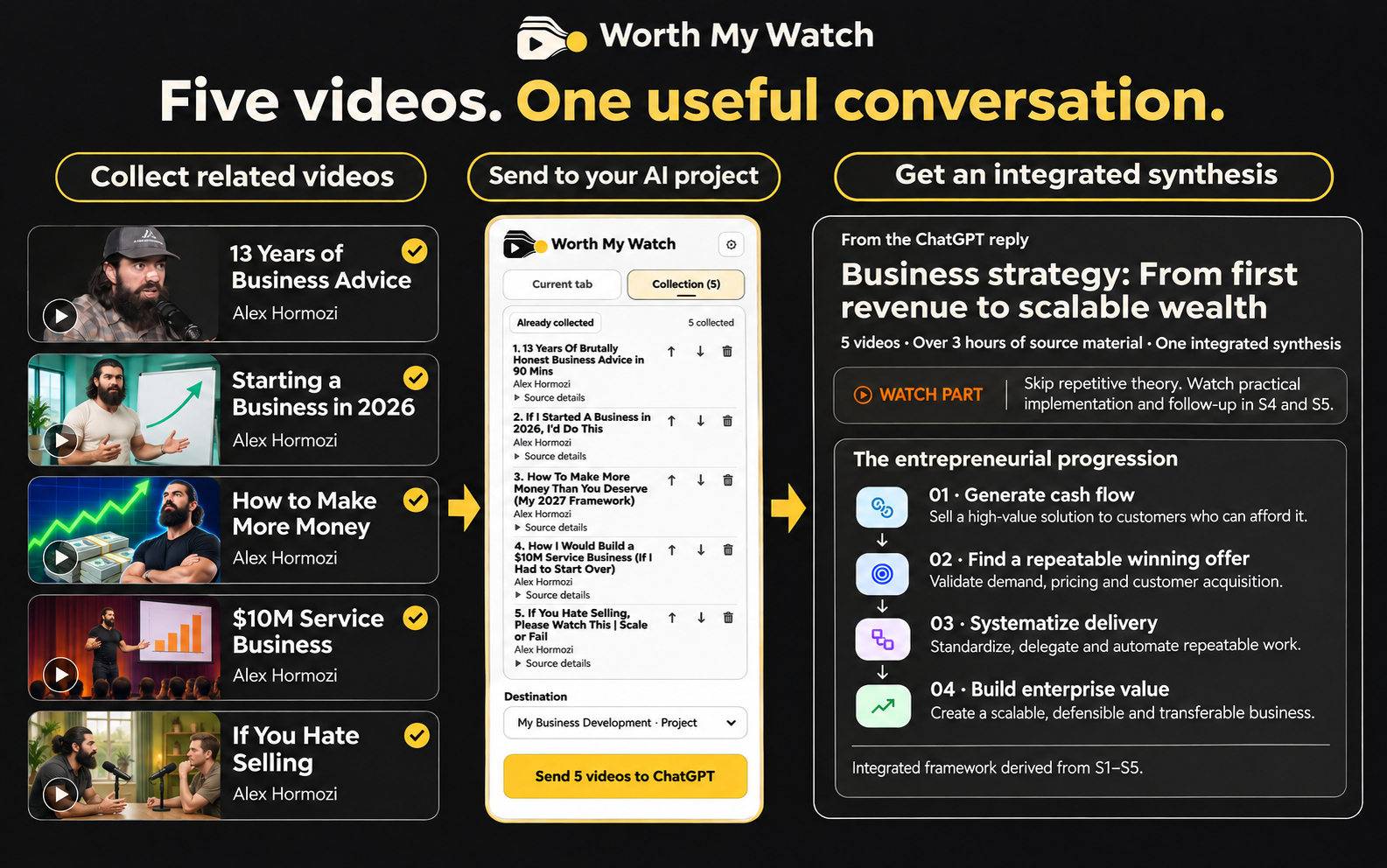
Five business videos. One useful conversation.
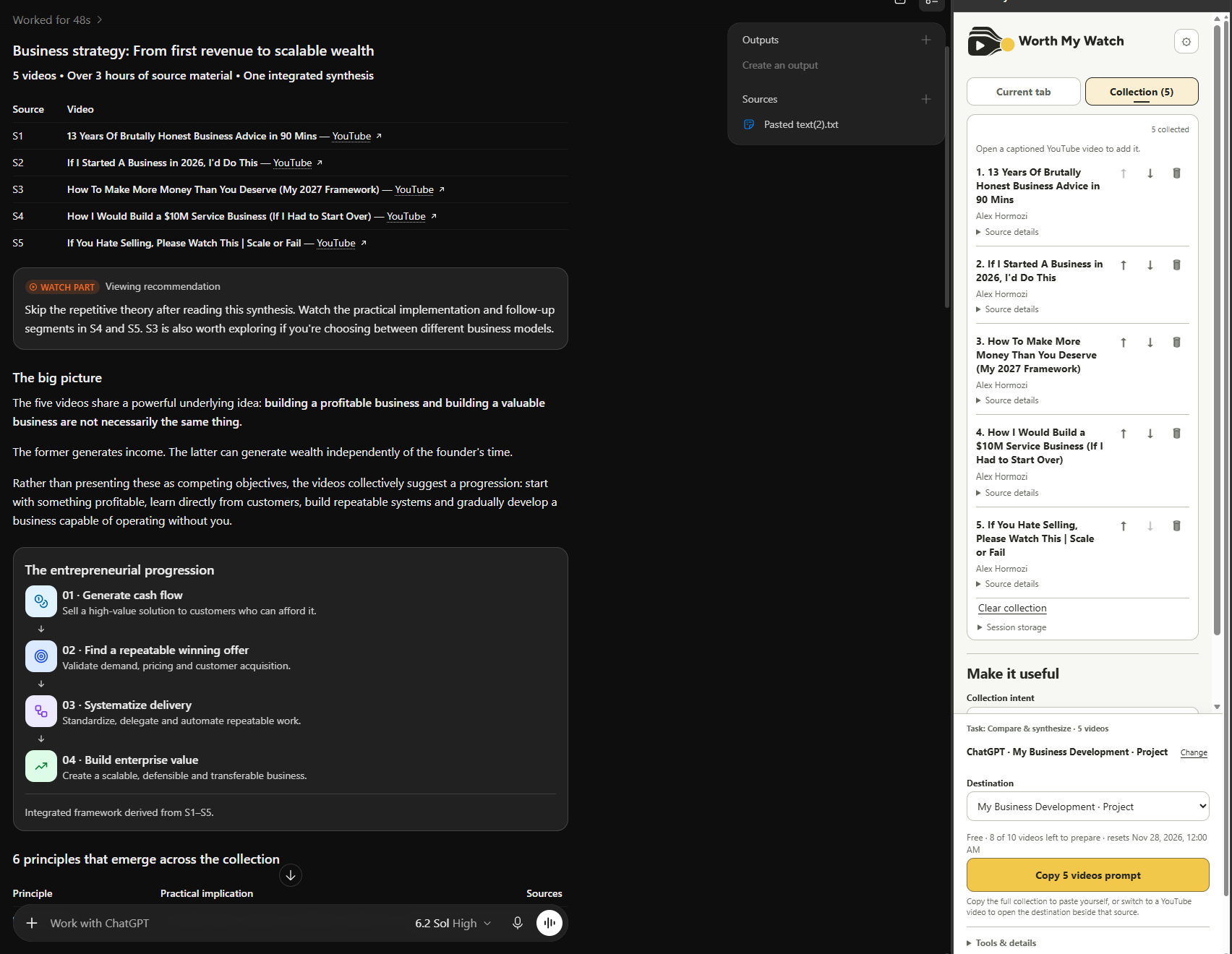
Collect five related Alex Hormozi videos, bring them into your My Business Development project in ChatGPT, and compare their ideas in one integrated synthesis.
5 videos in one collection
- 13 Years Of Brutally Honest Business Advice in 90 Mins
- If I Started A Business in 2026, I'd Do This
- How To Make More Money Than You Deserve (My 2027 Framework)
- How I Would Build a $10M Service Business (If I Had to Start Over)
- If You Hate Selling, Please Watch This | Scale or Fail

Bring them into your project
Collection · Compare & synthesize
ChatGPT Project
My Business Development
Five videos, over three hours of source material, one conversation in the project where you're already working.
From the real ChatGPT reply
Watch partFrom first revenue to scalable wealth
The reply connects the five sources into a progression:
- Generate cash flow.
- Find a repeatable winning offer.
- Systematize delivery.
- Build enterprise value.
Its viewing recommendation: skip repetitive theory and watch practical implementation and follow-up segments in sources S4 and S5.
I’m building my first app with AI. Which ideas from this interview should I use?
Selected video
 2:02:36
How to Actually Code with AI (ft. Matt Pocock)
Open in ChatGPT
Video · Apply to Project
ChatGPT Project
Building my first app
This is where you’ve worked out who the app is for, built the first version, fixed bugs and decided what can wait until after launch.
Illustrative ChatGPT reply · excerpt
Watch partStart at 14:31.
You’ve already decided what belongs in your first release. Watch how Matt gets the AI to ask questions before it writes code. For your next feature, try asking, “What are you about to assume that I haven’t decided yet?”
- Adopt
- Work through the open questions with ChatGPT one at a time before it builds the feature.
- Adapt
- At 20:29, Matt explains why he records design decisions. For your app, one sentence about what you chose and why gives you something to refer back to when the question comes up again.
- Park
- Leave automatic code cleanups until after launch. Feedback from the first people to use the app will tell you which parts need work.
What if I have six videos on the same topic?
Illustrative collection
Six videos, six opinions. Is it worth running my own AI agent?
6 videos you selected
2h 6m of video
- Dots vs. Muse on the same research task18 min
- I used Grok Bot for a week24 min
- What I’d hand over to Claude Duet16 min
- Running my own agent with OpenClaw21 min
- Why I moved my weekly briefing from OpenClaw to Hermes Agent28 min
- Is running your own AI agent worth the upkeep?19 min
Open in ChatGPT
Collection · Compare & synthesize
ChatGPT Project
My AI workflows
You’ve been using this project to compare tools, collect research and work out which jobs you’d trust an agent to do on its own.
Illustrative ChatGPT reply · excerpt
Watch partStart with two of the six videos.
The Hermes switch video shows what goes into a finished briefing. The upkeep video asks who notices when a source goes missing. Since you’re deciding which research jobs you can trust an agent to handle, watch those two parts together.
- Results
- Dots and Muse tackle the same research question, so you can compare their answers directly. The Grok Bot diary and Claude Duet walkthrough show other jobs you could hand over.
- Setup
- Save the OpenClaw setup walkthrough for when you know you want to run an agent yourself.
- Still open
- There’s no common test across all six videos. A polished briefing tells you little about how long you’d spend checking the sources each week.
Illustrative example
Choosing a new trail bike
2 videos you selected
- Which trail bike felt best on the descents?
- Six months on the longer trail bike
Open in ChatGPT
Collection · Compare & synthesize
ChatGPT conversation
Choosing my next trail bike
You’ve talked through your budget, what you love about your current bike and the trails you ride most weekends. It’s the rough descents that have you looking again.
Illustrative ChatGPT reply · excerpt
Watch partA steadier descent could cost you room in the turns.
Both reviewers liked the longer bike on rough descents. The six-month reviewer adds one detail that matters on your usual loop: they needed a wider line through tight turns.
- Trade-off
- Watch the rough descent in the first review, then the switchbacks in the second. You’ve said easy cornering is what you love about your current bike.
- Still open
- Neither reviewer rode your loop. If you demo the bike, that downhill followed by your favourite tight corners is the comparison that matters.
Illustrative example
Should I add this challenge to my training?
1 video you selected
- What I learned from 30 days of push-ups
Open in ChatGPT
Video · Apply to Project
ChatGPT conversation
My fitness routine
You’ve used this chat to plan workouts around work, track what you enjoy and rethink the weeks that get too busy. Your evening walks have stuck. Midday breaks keep slipping.
Illustrative ChatGPT reply · excerpt
SkimBorrow the reminder for the break you keep missing.
Skim to where the creator explains how they remembered the push-ups on busy days. They linked them to something they already did. Your evening walks already have that rhythm.
- Adapt
- Let the end of your last morning call be the cue for a short walk before you open the next tab.
- Park
- The daily push-up target can wait. The habit you wanted to build was getting away from the desk at midday.
Illustrative example
Improving my landscape photography
1 video you selected
- The same ridge at noon and at sunset
Open in Claude
Video · Analyze
Claude conversation
Learning landscape photography
You’ve been bringing your hiking photos into this Claude chat to talk about framing, light and what to try next. Several were taken from the same lookout at lunchtime.
Illustrative Claude reply · excerpt
Watch partLook for the shadow between the ridges.
In the noon-and-sunset comparison, the photographer credits the side light for making the nearer ridge stand out. That’s one reason the same view could look flatter in your lunchtime photos.
- Evidence
- Watch the two shots together. If the camera position or framing changed too, either could help explain the difference.
- Test
- Go back to your usual lookout later in the day. Keep the spot and framing the same, then compare the two photos. Is it easier to pick out the nearer ridge?
Frequently asked questions
Which AI assistants can I use?
Choose ChatGPT, Claude, Gemini, Grok or Microsoft Copilot using your own assistant account. Worth My Watch requires no separate account, assistant sign-in credentials or API key. Assistant availability, supported destinations and handoff options vary; your account’s features and limits still apply. Copilot uses Copy & Open: you paste and send the prompt yourself. The extension is designed for desktop Chrome and Microsoft Edge.
How is this different from pasting a YouTube transcript myself?
You can paste a transcript yourself. Worth My Watch gathers the available captions, keeps the title, link and timestamps with them, and prepares a draft with your chosen task. Your own assistant writes the reply, and you can keep asking questions in the same chat.
Can I bring a video into an existing chat or Project?
Where supported, choose the conversation or Project where you want to discuss it. Available destinations and handoff options vary by assistant; not every assistant supports the same Project workflow. Your assistant can use only the context actually available there. With Copilot, use Copy & Open, then paste and send in the conversation you choose.
Can it tell me which parts are worth watching?
Yes. Ask which parts are worth watching for your project and why. When the captions include suitable timestamps, you can jump straight to those moments.
Can I compare several videos or use videos from a playlist?
Yes. Open each video you want and add it to a Collection. The videos keep their own titles and links, so you can ask where the creators agree, where they differ and which advice fits your situation.
Which YouTube videos work? Can the assistant see what’s on screen?
Choose a video with accessible captions, including auto-generated captions. Your assistant works from that text. A chart or demonstration that nobody describes can be missing from its answer. A video without accessible captions has no transcript for the extension to use.
Can I review what gets shared with my assistant?
Yes. Preview the prompt in the extension before opening it. Previewing or adding a video to a Collection doesn’t send it to an assistant. Gemini and Grok may request optional site access to prepare a draft. Once text is placed in an assistant’s message box, that service can access it before you press Send. With a supported manual Open option, you review the draft and send it yourself. With AutoSend enabled on a supported handoff, Worth My Watch requests Send once after checking the draft. Copilot is Copy & Open only: you paste and send yourself. If a handoff is unavailable, use Copy prompt or save the prompt as a file.
Is Worth My Watch free?
The free edition includes up to 10 different videos per day per browser profile. Using the same video again that day counts once. A Collection counts only videos you haven’t already used that day. Your assistant’s own limits still apply.
What does Plus change?
Free includes up to 10 videos per day. Plus is planned to remove Worth My Watch's daily allowance, but your assistant's limits and other technical limits still apply. Plus is currently being tested. Contacting us about Plus is an enquiry, not a purchase.
Ready to put your backlog to work?
Install Worth My Watch free from the Chrome Web Store for Chrome or Microsoft Edge. Free includes up to 10 distinct videos per day, with your own assistant account. The dedicated Microsoft Edge Add-ons listing has been submitted and is awaiting review.
Install freeSaved you an evening?
Hi, I’m Patrik, the independent developer behind Worth My Watch. I love a good beer. If my little extension helped you get some of your evening back, feel free to buy me one!
Buy me a beerOptional one-time support.